Distance Team Meeting Illustrations for Modern Projects
Visual Style and Professional Appeal
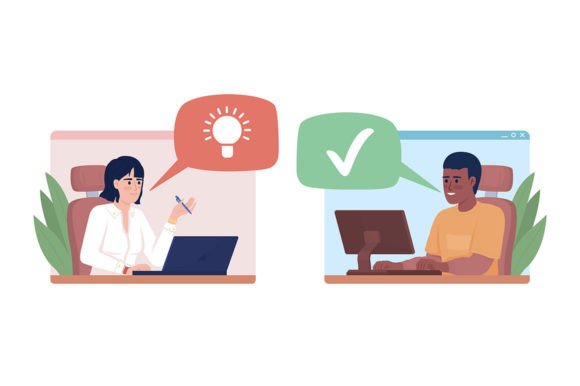
When you need to convey a sense of connected, modern collaboration, the visual assets you choose are just as important as the words you write. The Distance Team Meeting Illustrations collection offers a specific solution to this challenge. It features a flat concept vector style, characterized by clean lines, bold shapes, and a limited, harmonious color palette. The characters are rendered in a friendly, 2D cartoon aesthetic that feels approachable and professional without being overly childish. This style is a cornerstone of contemporary web design and digital communication, as it loads quickly, scales perfectly, and maintains its charm across devices.
The personality of these illustrations is one of efficiency and positivity. The scenes depict focused work, online communication, and network collaboration. The characters are designed with neutral expressions and dynamic poses, making them versatile for a wide range of contexts. Because they are presented as editable 2D cartoon characters, you have the creative freedom to adjust colors and elements to fit your specific project needs. The collection includes three distinct scenes, providing a mini-narrative toolkit for depicting virtual teamwork. The availability in EPS, JPEG, AI, SVG, and PNG formats ensures you have the right file for any software or platform.
Where These Illustrations Shine
These assets are not just generic clip art; they are functional design assets built for real-world application. In brand identity projects, particularly for tech startups, co-working spaces, or SaaS products, these illustrations can become a core visual element. They help humanize digital interfaces and marketing materials. For a logo design or a set of icons, the clean vector lines ensure that the imagery remains crisp at any size, from a tiny favicon to a large banner.
In the realm of marketing and social media graphics, consistency is key. Using a cohesive set like the Distance Team Meeting Illustrations helps build visual recognition. Imagine a series of Instagram posts explaining a new remote work tool; using these illustrations creates a unified look that guides the viewer's eye. For editorial design, such as blog headers or magazine features about the future of work, these vectors provide a modern, engaging alternative to stock photography. They are also ideal for presentation design, breaking up text-heavy slides and reinforcing concepts of connectivity and productivity.
For packaging design in the tech or productivity niche, or for creating ready-made banners for an e-commerce site, the transparent background PNGs are particularly useful. They allow you to layer the characters over any color or pattern seamlessly. The white background JPEGs are perfect for quick mockups or print materials where simplicity is required.
Integrating Illustrations into Your Workflow
Choosing the right illustration set is similar to selecting a premium font or typeface for a project. You must consider the overall tone. The flat, geometric style of these characters pairs exceptionally well with clean, modern typography. Think of pairing them with a sans serif font for headlines or a handwritten font for a more casual, friendly note. Avoid pairing them with overly ornate script fonts or heavy, traditional serif fonts, as this can create a visual clash. The goal is to maintain a cohesive visual hierarchy where the text and imagery complement each other.
When evaluating the fit for your project, test the illustrations in context. Place them on your website mockup next to your chosen font pairing. Do they scale well alongside your body text? Do the colors clash or harmonize with your brand palette? Because the files are editable vectors, you can tweak the character's clothing or hair color to match your brand's primary and secondary colors. This level of customization elevates a project from looking "template-based" to feeling bespoke and professional.
Consider the specific use case. For a mobile app interface, the SVG format is essential for fast loading and perfect rendering on high-density screens. For a printed brochure or flyer, the AI or EPS files ensure high resolution. For quick social media edits, the PNG files on a transparent background are ready to drop into any design tool.
Practical Considerations for Commercial Use
Before finalizing any design assets, always review the licensing. The Distance Team Meeting Illustrations collection is suitable for both personal and commercial projects, but understanding the terms ensures you can use them confidently in client work, products for sale, or advertising campaigns. This is a crucial step, much like verifying the license for a commercial font.
Think about audience engagement. Illustrations can significantly increase the time users spend on a page or their emotional connection to a brand. These specific illustrations, focusing on remote work and online communication, resonate strongly with a modern audience that values flexibility and digital connectivity. They signal that a brand is current, tech-savvy, and human-centric.
Finally, explore the broader ecosystem. The creators of these illustrations offer a range of other vector characters, backgrounds for animations, and creative fonts. Building a library of complementary assets from the same source can save you significant time and ensure visual consistency across all your future projects. Whether you are a designer, entrepreneur, or content creator, having a reliable toolkit of high-quality, editable illustrations is an investment in the professionalism and clarity of your visual communication.